Predator MDC™ Software
What is Predator MDC?
Predator MDC is real-time machine monitoring software that automatically collects, reports, charts and processes real-time shop floor manufacturing data including OEE, cycle time, idle time, setup time, teardown time, machine downtime and more. Predator MDC improves manufacturing by supplying accurate shop floor productivity KPIs and metrics to improve operations and to make better decisions. Choose from three editions:
- Predator MDC Express
- Predator MDC
- Predator MDC Enterprise
Why use Predator MDC?
Predator MDC creates a continuously up to date knowledge base of your manufacturing performance. It quantifies how well your machines are utilized, the productivity of your people and the rates of production. Predator MDC can establish and compare continuous improvement results for lean manufacturing efforts. Predator MDC organizes your real-time data into actionable KPIs and metrics for availability, quality and performance. KPIs and metrics for specific machines or rolled up KPIs and metrics for an entire department across multiple plants are available with a few mouse clicks. Refer to the following major features:
- Automatic machine monitoring
- Automatic data collection
- Manual machine monitoring
- Manual data collection
- 1 Network to monitor all CNC machines, robots, PLCs, data recorders & ATE test stands
- 18 Real-time Dashboards for digital signage
- Real-time digital signage and slideshows
- Multiple plant support
- Unlimited number of data collection events
- 100+ manufacturing KPIs and production metrics
- 30,000+ Reports and Charts
- Real-Time OEE Dashboard, OEE Charts and OEE Reports
- Supports wireless Ethernet, wired Ethernet, RS-232, digital I/O, analog I/O and sensors
- Open API and database architecture
- Windows application integration with ERP, MES or PLM
- Secure Browser / web application integration with ERP, MES or PLM
- Includes Predator CNC Service
- Includes Predator MDC Executive
- Includes Predator MDC for DOS
- Includes Predator DNC for Send, Receive and Dripfeed
- Optional MDC for Android application Learn More >
- Use your existing ERP and MES bar coded paperwork
- Upgrade to Predator SFC
- 11 International Languages
- 250+ Online help topics
- Made in the USA - Learn more
Automatic machine monitoring and data collection
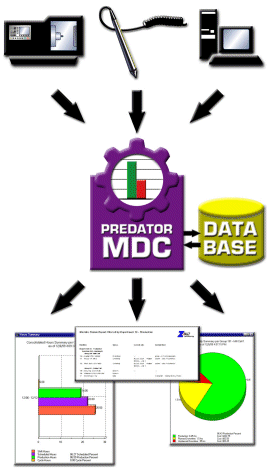
Predator MDC supports automatic, error-free, and unattended machine monitoring for events such as job start and end, setup start and end, cycle start and end, to name a few of the events that can be monitored. This type of data is collected automatically using software, hardware, custom macros and other methods without requiring operator training or input.
Manual machine monitoring and data collection
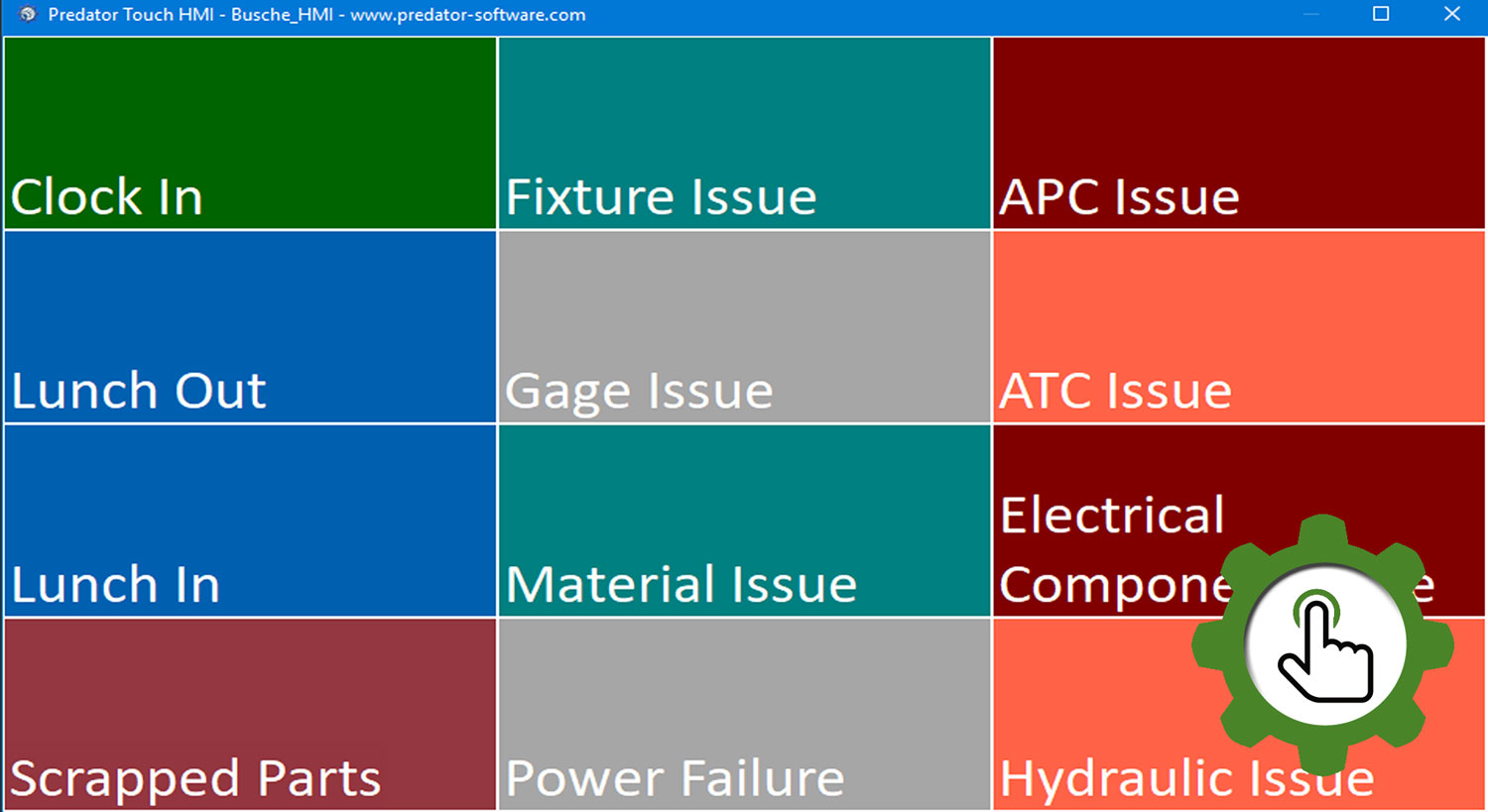
Predator MDC also supports manual monitoring of events that are initiated by machine operators such as machine logon/offs, downtimes, and scrap reasons. Predator MDC can be used to manually collect data using several methods including Remote Request™, swiping bar codes, touch screen tablets or standard PCs.
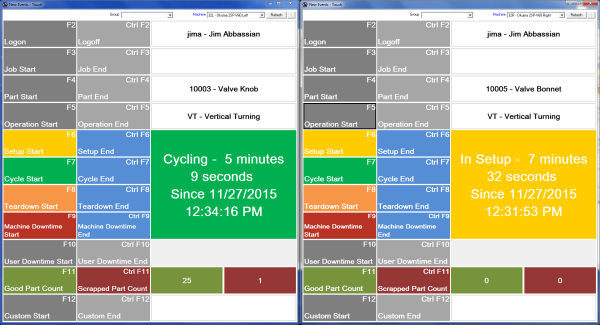
NOTE: The above example supports a Twin Spindle VTL with a dedicated window for each spindle. Support for multiple spindle gantries, 1 man 2, 1 man 3 and any combination is supported to simplify manual data collection.
Monitor all your CNC machines, robots, PLCs, data recorders and ATE test stands
Predator MDC supports up to 4096 CNC machines, robots, PLCs, data recorders, ATE Test Stands, band saws, dot peen markers and other equipment per PC for simultaneous cycle time, setup time, teardown time, downtimes with reasons, good parts, scrap parts with reasons and an unlimited number of user defined events.
Real-time dashboards for machine, job and part statuses
Keep score of your shop floor productivity with Predator MDC. Every second is tracked per machine, job, part, operation, shift and person. Real-time dashboards displays current machine, part, job, operation and personnel status. Multiple engineers, supervisors and managers can view dashboards from any networked PC. Leverage the power of the Internet and VPN from anywhere in the world to see the status of your shop floor.
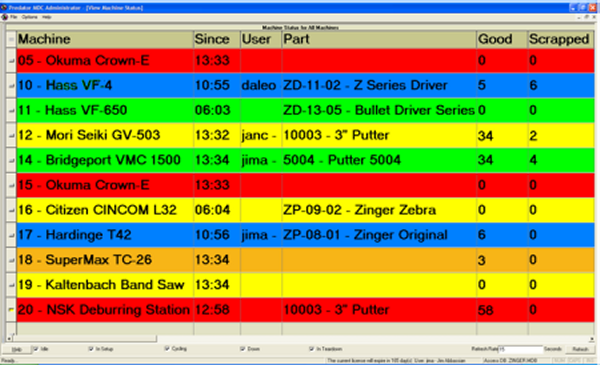
Custom or shop specific dashboards can be created in just minutes. They are completely configurable with unique KPIs, metrics, colors, images and sizes with support for all screen resolutions and sizes.
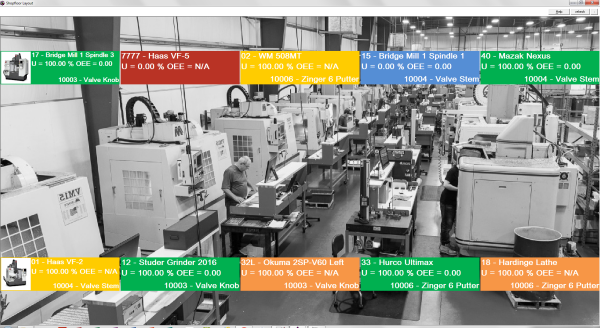
Real-time digital signage and slideshows
Dedicate one or more large screen monitors on the shop floor for real-time digital signage. Create slides of charts, dashboards and reports with specific filters and details. Eliminate manual posting of paper reports and charts. Provide a focal point for standup shop meetings while enforcing productivity and manufacturing KPIs and metrics that management, engineering and quality departments care about.
Multiple Plant Support
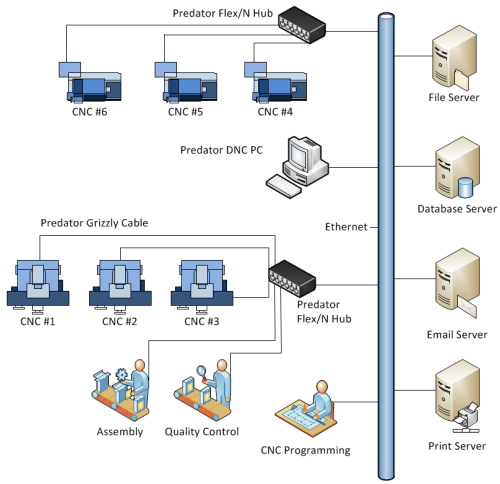
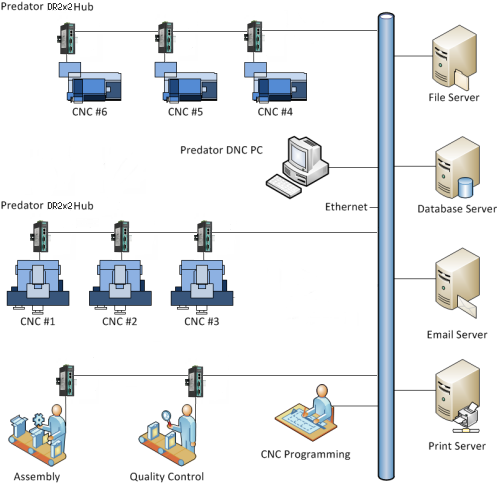
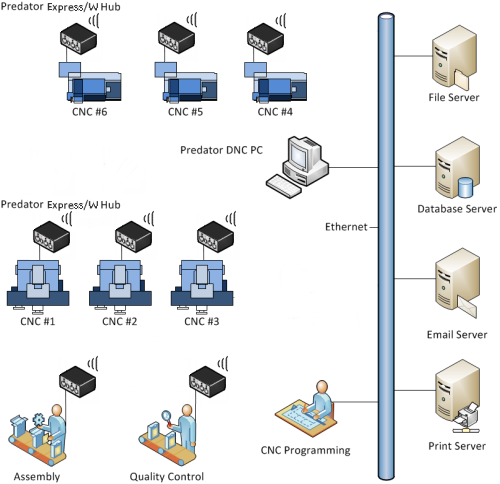
Predator MDC supports an unlimited number of plants or buildings right out of the box. Multiple plants can share a single database for enterprise wide reports and charts or each plant can have a separate database. Compare plants or compare buildings to improve productivity. Organize your machines by grouping them per building or cell. Network PCs, CNCs, robots, PLCs, data recorders and ATE test stands to create an entire real-time shop floor machine monitoring and data collection system.
Predator MDC Adapter - Only $500 per Machine
Hardware based data collection for older CNCs, manual machines and other equipment are supported. Predator MDC Adapters are din rail mounted and are wired into signal lamps, light towers, extended M functions or any digital input or output. Predator MDC Adapters are available in 5, 12, 24, 48, 110 and 230 volt editions. Domestic and international editions simplify installation and configuration.
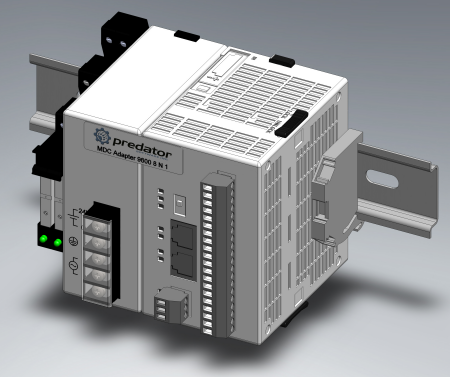
NOTE: The Predator MDC Adapter pictured above converts electrical input from any machine into text messages. To date assembly lines, band saws, dot peen markers, CNC machines, manual machines, robots, PLCs, data recorders, ATE test stands and many other machines types have leveraged the power of the Predator MDC Adapter.
Unlimited number of data collection events
An unlimited number of data collection events such as cycle start, cycle end, good part, scrapped part, etc. can be collected via 20+ different methods designed to maximize automatic machine data collection and minimize manual data collection.
30,000+ Reports and Charts
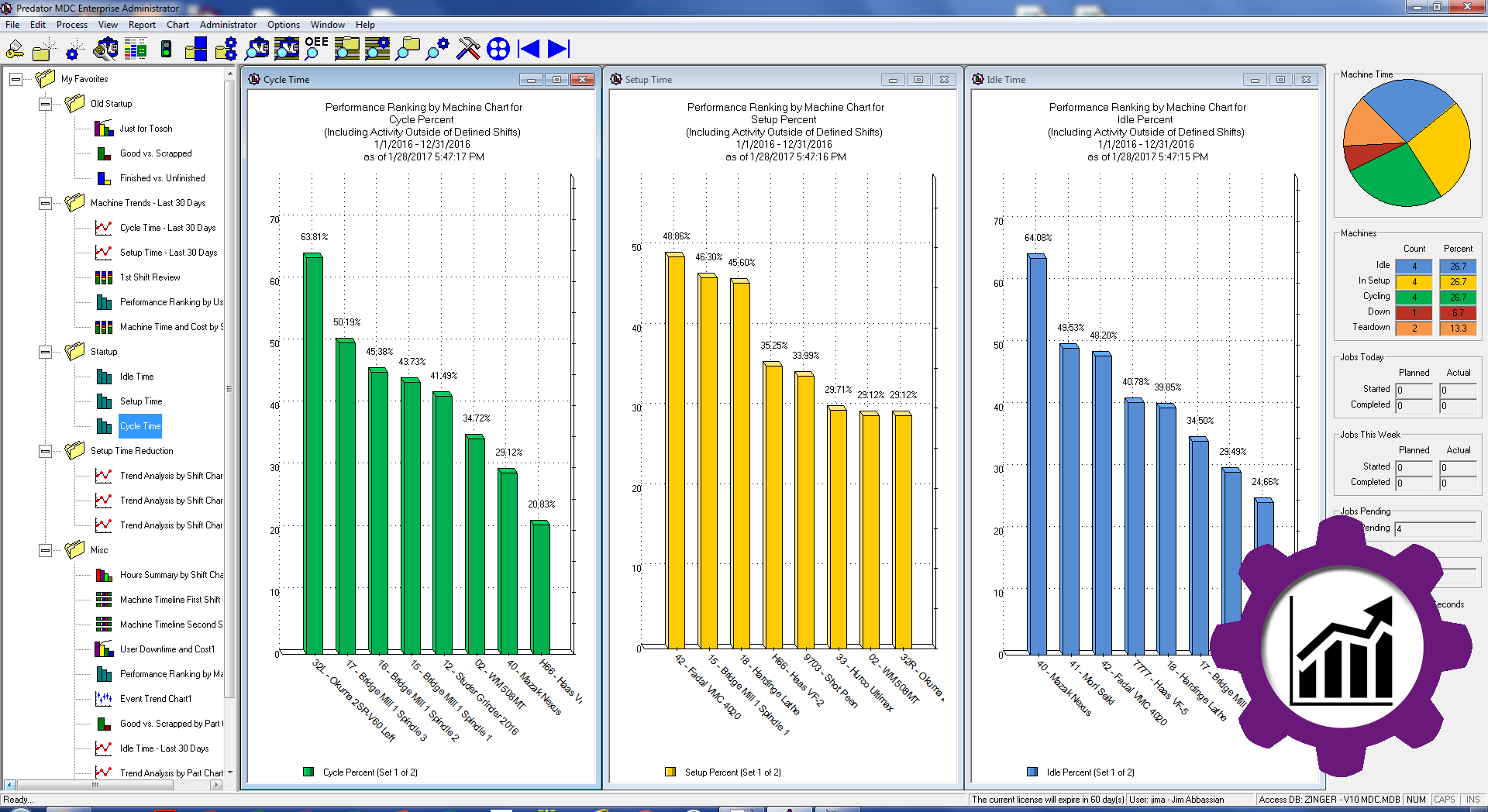
Over 30,000 reports and charts provide unique insight into the productivity and efficiency of each manufacturer. Identify issues and drive improvements via flexible reporting and charting. Predator MDC converts volumes of raw data into 100+ actionable KPIs. Multiple pie, bar, pareto and trend charts can be combined to create custom dashboards organized within a collection of favorites.
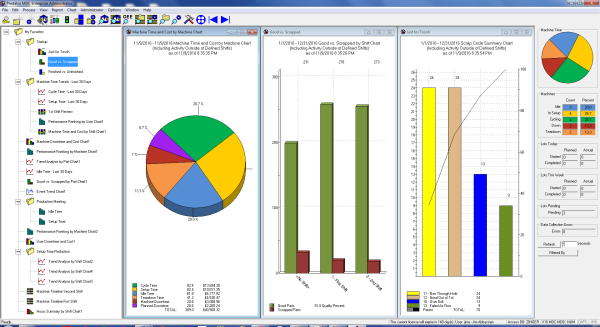
Create and manage multiple trend charts with ease with real-time updates.
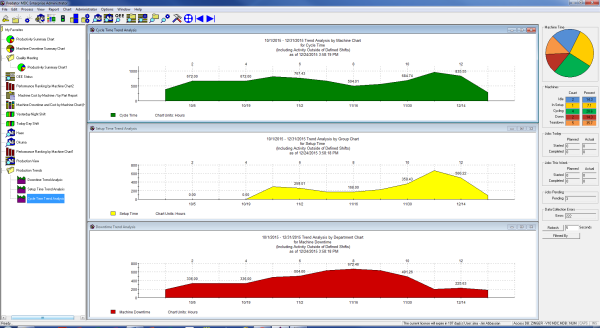
Still need more dashboards, reports and charts? Get creative and create your own with Crystal Reports, Microsoft Access, Microsoft SQL Reports, Oracle Reports or hundreds of other BI applications.
Real Time OEE Software
Eliminate manual OEE driven data collection and OEE spreadsheets. Predator MDC supports real time OEE data collection with an OEE Dashboard, OEE Performance ranking charts, OEE Trend Analysis charts and OEE Reports.
Ethernet, RS232, RFID, digital I/O, analog I/O, data recorders and sensors
Data collection support via a wide range of industrial and computer technology standards provides extensive compatibility and implementation flexibility for your existing equipment. Predator MDC can utilize existing wired and wireless networks, I/Os, data recorders and sensors. Customers with a mix of equipment can leverage the power of Predator MDC to collect, process and store all event details within a single Microsoft Access, Microsoft SQL Server or Oracle database.
ERP and MES Integrations
Predator MDC provides multiple methods to integrate your ERP and MES systems with Predator MDC Enterprise. Integration consulting services and implementation services are also available to ensure the integration process is successful. Standard integration options include CSV, JSON, MTConnect, OPC-UA, Predator APIs, TSV and XML. In addition, Predator Software can provide a complete database schema for direct database style integration.
The Predator MDC Export Service includes 40+ tags per machine and is designed to export Predator MDC data in real-time via JSON, MTConnect, OPC UA or XML. Example tags include current machine status, utilization % and OEE % per machine. The Predator MDC Export Service provides real-time productivity data to one or more ERP, MES or business applications 24x7x365.
Predator MDC's APIs (application programming interface) include 300+ fully documented methods with examples. Develop ERP, MES and shop floor validation, flow part and job numbers from ERP directly into Predator and numerous other automation projects can be completed with C#, C++, VB.Net, VB6, VB script, Windows Script, Delphi and other compatible programming languages.
Predator MDC is based on an open architecture client/server database standard. Select from Oracle, Microsoft SQL Server or Microsoft Access databases.
Windows application integration with ERP, MES or PLM
Predator MDC can integrate with Windows based ERP, MES or PLM systems. Over a dozen different command line options can be used to share specific Predator MDC screens, user credentials and database connections.
Secure Browser / web application integration with ERP, MES or PLM
Predator MDC can integrate with browser based or web application based ERP, MES or PLM systems. Over a dozen different command line options can be used to share specific Predator MDC screens, user credentials and database connections. The browser or web application based ERP, MES or PLM systems can be hosted on premise or in the cloud.
70+ Industrial Machine Monitoring Protocols
Predator MDC includes automatic data collection interfaces including MTConnect, Fanuc Focas, Fanuc Robot, Okuma THINC, Modbus TCP/IP, OPC, Haas and XML. 20 different methods of data collection provide enough flexibility to support every CNC machine, robot, PLC and test stand on your shop floor. Refer to the following standard 70+ industrial machine monitoring protocols that are included with Predator MDC Enterprise:
| Protocol | Interface | Application |
|---|---|---|
| ASCII - Simple | Serial, Ethernet & Parallel | CNC, PLC, Robot, CMM, 3D Printer & Other |
| ASCII - Custom | Serial, Ethernet & Parallel | CNC, PLC, Robot, CMM, 3D Printer & Other |
| Allen Bradley SLC | Ethernet | PLC |
| Binary - Simple | Serial, Ethernet & Parallel | CNC, PLC, Robot, CMM, 3D Printer & Other |
| Binary - Custom | Serial, Ethernet & Parallel | CNC, PLC, Robot, CMM, 3D Printer & Other |
| Bostomatic | Serial | CNC |
| Brother Dialog | Serial | CNC |
| Bridegport Easylink | Serial | CNC |
| BTR | Parallel | NC & Other |
| BWO DNC | Serial | CNC |
| Camate | Serial | CNC |
| Cincinnati Laser | Ethernet | CNC |
| Cognex Dataman | Ethernet | Bar Code Reader & Other |
| Danobat | Ethernet | CNC |
| DMG Mori Seiki MAPPS | Ethernet | CNC |
| DMG Mori Seiki Celos | Ethernet | CNC |
| EIA358C | Serial | CNC & Other |
| Elexa | Ethernet | CNC |
| Excellon | Serial | CNC |
| Fadal Checksum | Serial | CNC |
| Fagor 8020 | Serial | CNC |
| Fagor 8050 | Serial | CNC |
| Fanuc A | Serial | CNC |
| Fanuc Expand A | Serial | CNC |
| Fanuc Cassette | Serial | CNC |
| Fanuc DPRNT | Serial | CNC |
| Fanuc FOCAS | Ethernet | CNC - Learn more |
| Fanuc Robot | Ethernet | Robot - Learn more |
| FTP Client | Ethernet | CNC, PLC, Robot, CMM, 3D Printer & Other |
| FTP Server | Ethernet | CNC, PLC, Robot, CMM, 3D Printer & Other |
| GE IPP | Serial | CNC |
| Haas 143 | Serial | CNC |
| Haas DPRNT | Serial | CNC |
| Haas | Ethernet | CNC - Learn more |
| Heidenhain | Serial | CNC |
| Heidenhain | Ethernet | CNC |
| Highland BTR | Serial | CNC |
| Kauffman | Serial | CNC |
| JSON | Ethernet | Other |
| Kermit | Serial | CNC, PLC & Other |
| Linatrol | Serial | CNC |
| LSV2 | Serial | CNC |
| Mazak DPRNT | Serial | CNC |
| Mazak Mazatrol | Serial | CNC |
| Microsoft Access | Ethernet | Other |
| Microsoft SQL Server | Ethernet | Other |
| Mitsubishi DPRNT | Serial | CNC |
| Modbus TCP/IP | Ethernet | PLC, Data Recorder & Other - Learn more |
| Motoman Yaskawa | Serial | Robot |
| MTConnect | Ethernet | CNC, Robot, CMM & Other - Learn more |
| Okuma A | Serial | CNC |
| Okuma B | Serial | CNC |
| Okuma THINC | Ethernet | CNC - Learn more |
| Okuma User Task 2 | Serial | CNC |
| OPC DA | Ethernet | CNC, PLC, Robot, CMM, 3D Printer & Other - Learn more |
| OPC UA | Ethernet | CNC, PLC, Robot, CMM, 3D Printer & Other - Learn more |
| Oracle | Ethernet | Other |
| Parpas | Ethernet | CNC |
| Predator HHT | Serial | Other |
| Predator MDC 3G | Ethernet | PLC |
| Predator MDC API | Ethernet | CNC, PLC, Robot, CMM, 3D Printer & Other |
| Predator Secure CM100 | Ethernet | CNC |
| Predator Secure DNC | Ethernet | CNC, PLC, Robot, CMM, 3D Printer & Other |
| Predator Secure Gerber | Ethernet | CNC |
| Predator Secure HID | Ethernet | CNC, PLC, Robot, CMM, 3D Printer & Other |
| Predator Secure OPC | Ethernet | PLC |
| Predator Secure Siemens | Ethernet | CNC |
| Predator Siemens OPC UA | Ethernet | CNC |
| RS244B | Serial | CNC & Other |
| SMB | Ethernet | CNC, PLC, Robot, CMM, 3D Printer & Other |
| Starlink | Serial | CNC & Other |
| TCPIP Client | Ethernet | CNC, PLC, Robot, CMM, 3D Printer & Other |
| Text File | Ethernet | CNC, PLC, Robot, CMM, 3D Printer & Other |
| XML | Ethernet | CNC, PLC, Robot, CMM, 3D Printer & Other |
| XModem | Serial | CNC, PLC & Other |
Includes Predator MDC Executive
Predator MDC Executive is an easy to use browser based dashboard with multiple screens and charts which provides an executive overview of your shop floor. Designed for touch based mobile phones, tablets and PCs. A site license for Predator MDC Executive is included with the purchase of Predator MDC Enterprise Administrator or Predator MDC Administrator. Predator MDC Executive does not require IIS, Apache, browser plugins, flash support or client installation.
Optional advanced browser security features including HTTPS and IWA are included. Predator MDC Executive supports all modern browsers including the following:
- Microsoft Edge and Internet Explorer
- Mozilla Firefox
- Google Chrome
- Apple Safari
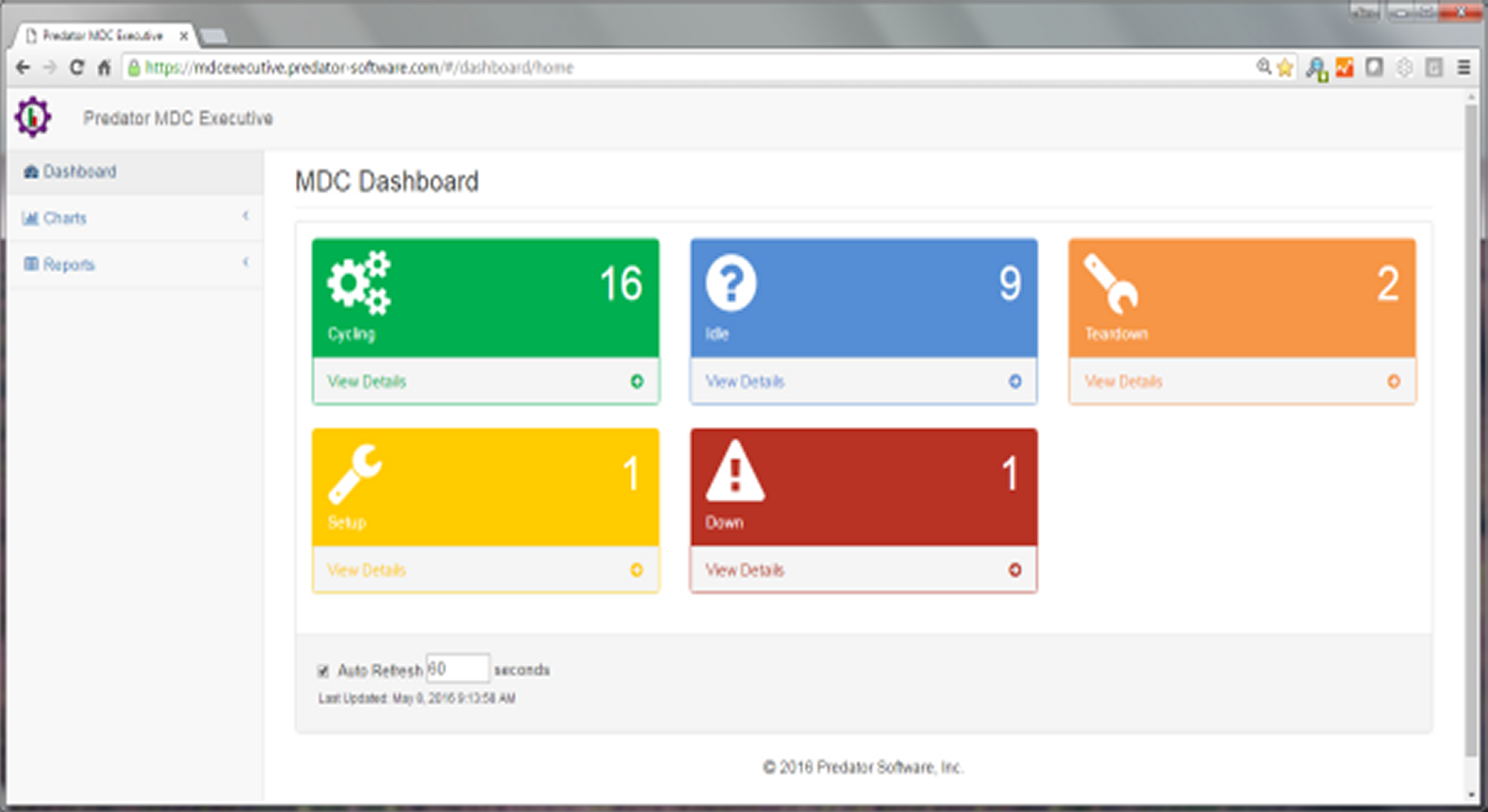 Click to view a live real-time instance of Predator MDC Executive
NOTE: Predator MDC Executive requires Microsoft SQL Server and Oracle. Support for Microsoft Access is coming soon.
Includes Predator DNC Enterprise or Predator DNC
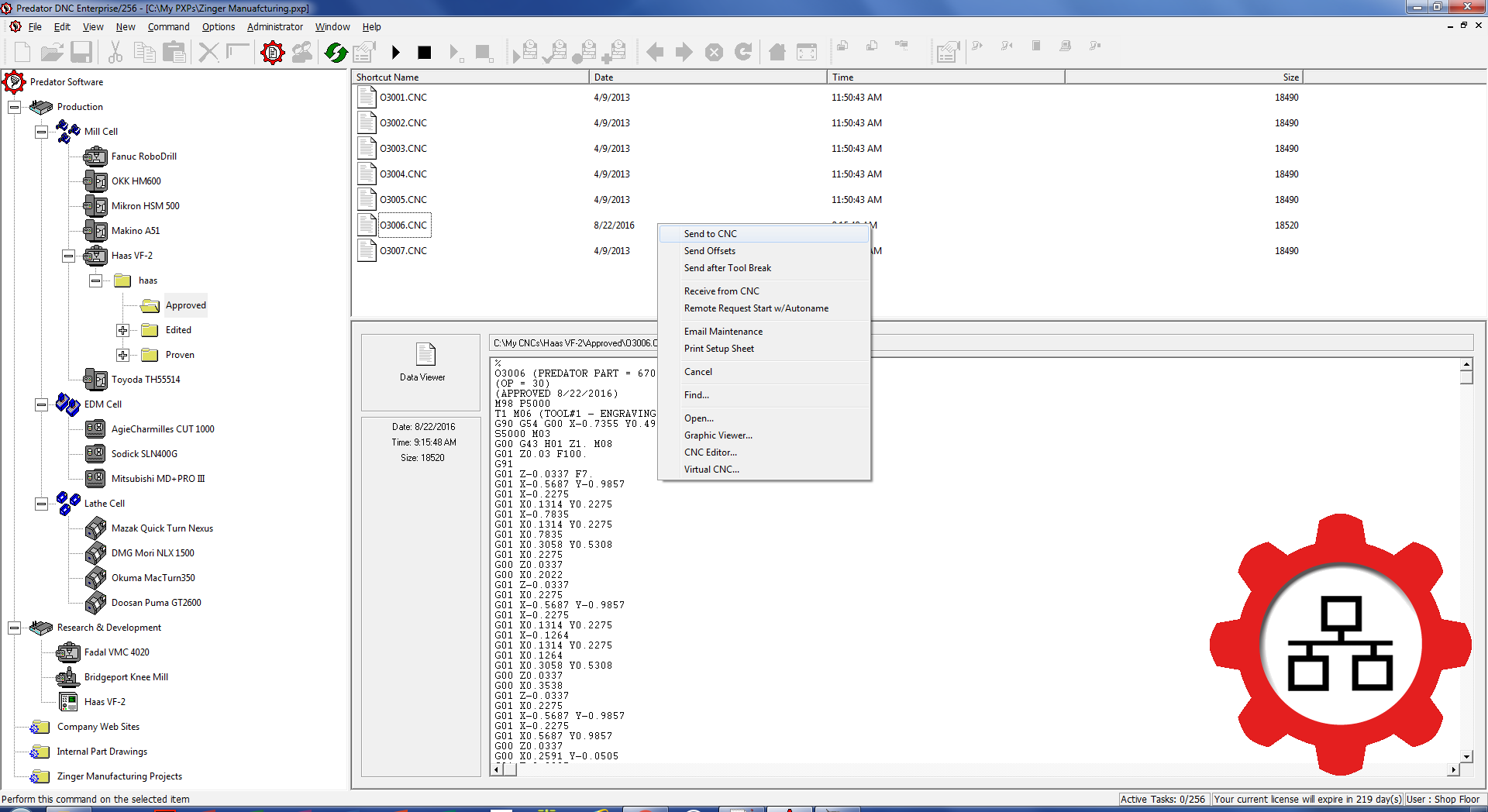
Every Predator MDC/x Enterprise includes Predator DNC/x Enterprise while every Predator MDC/x license includes Predator DNC/x for integrated Send to CNC, Receive from CNC and dripfeed operation.
Predator MDC Enterprise - Part Numbers
| Part # | Descriptions for Microsoft SQL Server licenses |
|---|---|
| 20561000 | Predator MDC Enterprise Administrator for SQL Server |
| 20561001 | Predator MDC Enterprise/1 for SQL Server |
| 20561002 | Predator MDC Enterprise/2 for SQL Server |
| 20561004 | Predator MDC Enterprise/4 for SQL Server |
| 20561008 | Predator MDC Enterprise/8 for SQL Server |
| 20561012 | Predator MDC Enterprise/12 for SQL Server |
| 20561016 | Predator MDC Enterprise/16 for SQL Server |
| 20561024 | Predator MDC Enterprise/24 for SQL Server |
| 20561032 | Predator MDC Enterprise/32 for SQL Server |
| 20561### | Increments of 8 up to maximum license of /4096 |
| 20561910 | Predator MDC Enterprise Client for SQL Server |
| 20561915 | Predator MDC Enterprise Shop Floor for SQL Server |
| Part # | Descriptions for Oracle licenses |
| 20581000 | Predator MDC Enterprise Administrator for Oracle |
| 20581001 | Predator MDC Enterprise/1 for Oracle |
| 20581002 | Predator MDC Enterprise/2 for Oracle |
| 20581004 | Predator MDC Enterprise/4 for Oracle |
| 20581008 | Predator MDC Enterprise/8 for Oracle |
| 20581012 | Predator MDC Enterprise/12 for Oracle |
| 20581016 | Predator MDC Enterprise/16 for Oracle |
| 20581024 | Predator MDC Enterprise/24 for Oracle |
| 20581032 | Predator MDC Enterprise/32 for Oracle |
| 20581### | Increments of 8 up to maximum license of /4096 |
| 20581910 | Predator MDC Enterprise Client for Oracle |
| 20581915 | Predator MDC Enterprise Shop Floor for Oracle |
Predator MDC - Part Numbers
| Part # | Descriptions for Microsoft SQL Server licenses |
|---|---|
| 20562000 | Predator MDC Administrator for SQL Server |
| 20562001 | Predator MDC/1 for SQL Server |
| 20562002 | Predator MDC/2 for SQL Server |
| 20562004 | Predator MDC/4 for SQL Server |
| 20562008 | Predator MDC/8 for SQL Server |
| 20562012 | Predator MDC/12 for SQL Server |
| 20562016 | Predator MDC/16 for SQL Server |
| 20562024 | Predator MDC/24 for SQL Server |
| 20562032 | Predator MDC/32 for SQL Server |
| 20562### | Increments of 8 up to maximum license of /4096 |
| 20562910 | Predator MDC Client for SQL Server |
| 20562915 | Predator MDC Shop Floor for SQL Server |
| Part # | Descriptions for Oracle licenses |
| 20582000 | Predator MDC Administrator for Oracle |
| 20582001 | Predator MDC/1 for Oracle |
| 20582002 | Predator MDC/2 for Oracle |
| 20582004 | Predator MDC/4 for Oracle |
| 20582008 | Predator MDC/8 for Oracle |
| 20582012 | Predator MDC/12 for Oracle |
| 20582016 | Predator MDC/16 for Oracle |
| 20582024 | Predator MDC/24 for Oracle |
| 20582032 | Predator MDC/32 for Oracle |
| 20582### | Increments of 8 up to maximum license of /4096 |
| 20582910 | Predator MDC Client for Oracle |
| 20582915 | Predator MDC Shop Floor for Oracle |
NOTE: Predator MDC licenses do not include licenses for Microsoft SQL Server, Oracle or Microsoft Access.
Predator MDC - Popular Options
| Part # | Description |
|---|---|
| 20209000 | Predator Java Scripting |
| 20209010 | Predator Secure HID |
| 20209020 | Predator Touch HMI |
| 20209030 | Predator VB Scripting |
| 20209040 | Predator C++ SDK |
| 20209080 | Predator DNC Connect |
| 20209090 | Predator PRemote |
| 20562920 | Predator MDC for Android - Learn more > |
| 20209930 | Predator MDC Export Service |
| 29900000 | Predator Floating License Manager - Learn more > |
Predator MDC Express - Part Numbers
| Part # | Descriptions for Microsoft SQL Server licenses |
|---|---|
| 20563000 | Predator MDC Express Administrator for SQL Server |
| 20563910 | Predator MDC Express Client for SQL Server |
| Part # | Descriptions for Oracle licenses |
| 20583000 | Predator MDC Express Administrator for Oracle |
| 20583910 | Predator MDC Express Client for Oracle |
| Part # | Descriptions for Access licenses |
| 20573000 | Predator MDC Express Administrator for Access |
| 20573910 | Predator MDC Express Client for Access |